I’m thinking about adopting Walter Writes AI for daily writing tasks but I’m not sure how reliable it is over time. If you use it regularly, how does it handle longer projects, edits, and consistency? Any real-world experiences, pros, cons, or issues I should know about before committing to it as my main writing tool would be really helpful.
Walter Writes AI – my experience and notes
I spent an afternoon messing around with Walter Writes AI and running the outputs through detectors. Results looked messy.
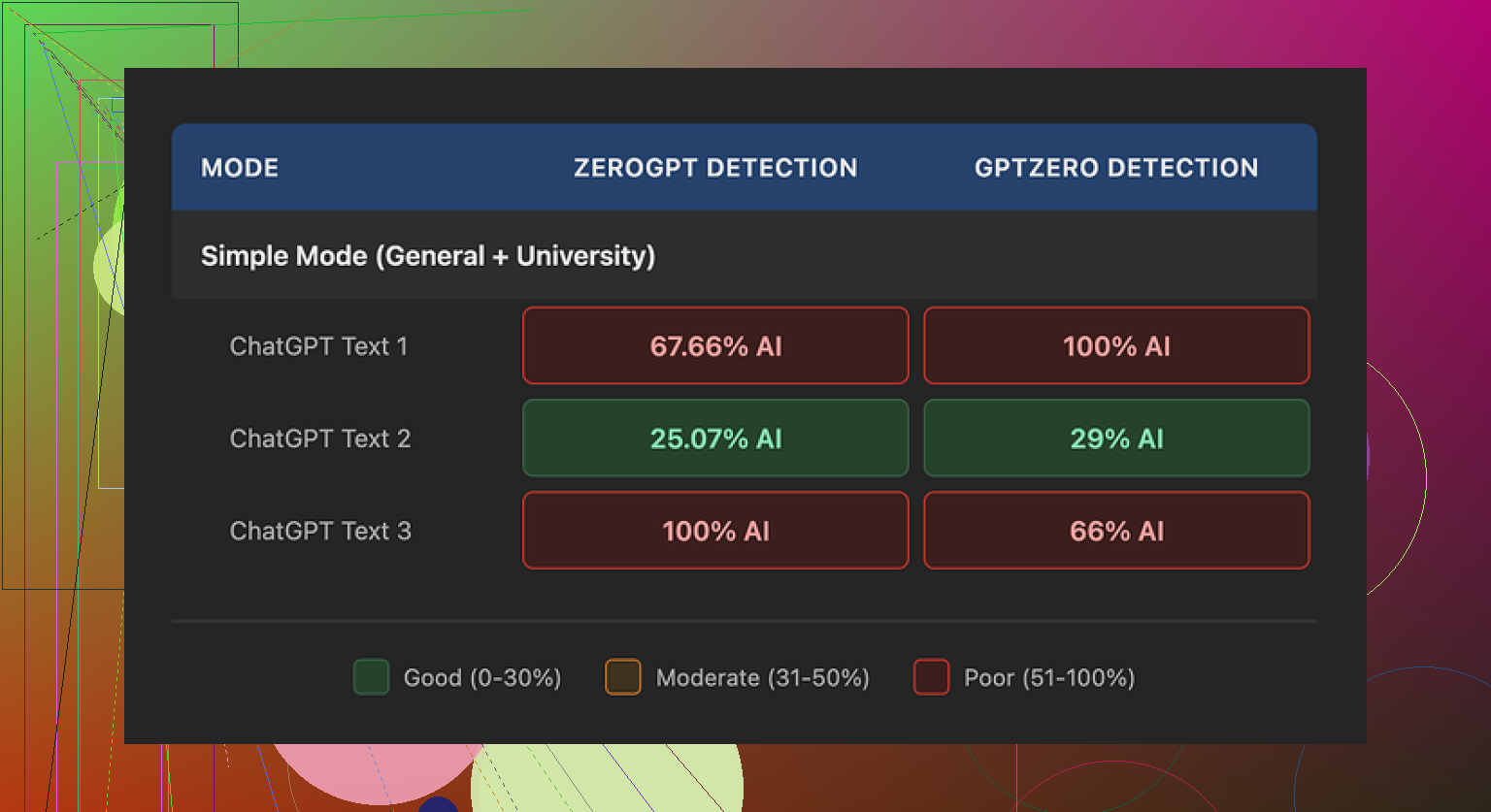
From the free tier I only had the “Simple” setting. No access to “Standard” or “Enhanced” that paying users get, so keep that in mind.
Here is what I saw:
• One test article hit 29% AI on GPTZero and 25% AI on ZeroGPT. For a free tool, that result is better than most of the other public “humanizers” I have tried.
• The other two samples were a disaster. Both hit 100% AI on at least one detector.
Those were from the same Simple mode, same source text, just different prompts. So the tool behaved inconsistently for me.
If you want to see the original comparison thread with screenshots and detector scores, it is here:
What felt “AI-ish” in the output
Once I stopped looking only at scores and read the text like a human, some patterns jumped out.
-
Weird punctuation
The tool loved semicolons. It used them in places where a normal writer would put a comma or split into two sentences. It gave the writing a stiff, stacked feel. After a few paragraphs I could pick them out without any detector. -
Repeated filler words
In one sample, the word “today” showed up four times within three sentences. That kind of repetition is typical of rushed AI output and is something detectors tend to notice over longer text. -
Formulaic parenthetical examples
Phrases with brackets like “(e.g., storms, droughts)” showed up again and again. Not once or twice for clarity, but peppered through the article in the same pattern. It read like a template.
Even when the detectors were fooled, the writing still felt generated. If your teacher or editor actually reads your stuff, this matters more than a green score on GPTZero.
Pricing and limits
Here is what the pricing looked like when I checked:
• Starter: 8 dollars per month on annual billing, 30,000 words total
• Unlimited: 26 dollars per month, but each submission capped at 2,000 words
• Free tier: 300 words total
The “Unlimited” label is a bit misleading if you need to process long documents. You would have to chop a 5,000 word essay into several chunks, which can create style jumps between sections.
What bothered me more was the policy side:
• The refund page uses heavy chargeback warnings, with threats of legal action if you dispute through your bank.
• Data retention for submitted text is not explained clearly. I did not find a straight answer on how long they keep your content or where it sits.
If you plan to feed in anything sensitive, that uncertainty is a problem.
What I ended up using instead
After comparing outputs across a few tools, the one I kept going back to was Clever AI Humanizer.
On my tests, the writing from Clever AI Humanizer sounded closer to how I write when I am not overthinking. Shorter sentences, fewer awkward transitions, less obvious “AI glue text”. It also did not ask for payment for the kind of usage I needed.
Link here:
Extra resources I found useful
If you want more detail or walkthroughs, these helped me:
Reddit tutorial on “Humanize AI” methods, with people sharing what worked on detectors they tried:
Reddit review thread focused on Clever AI Humanizer results:
YouTube video review going through tests in real time:

Practical takeaways from my tests
If you are trying to avoid AI flags:
- Do not trust one detector score. Cross check on at least two sites.
- Read the text out loud. If you hear patterns like “today, in today’s world, today we see” in a cluster, fix them.
- Kill repeated parenthetical structures and overuse of “for example” or “e.g.”. Change the way examples are introduced.
- Watch for punctuation habits. If a tool loves semicolons or long chains of commas, break things up manually.
- For long pieces, keep style consistent. If you use a tool with word caps, run the whole piece through the same process and then do a human editing pass to smooth the seams.
My bottom line after testing Walter Writes AI on the free tier: it sometimes slips past detectors, but the style quirks and policy worries pushed me toward other options.
5 Likes
I’ve used Walter Writes AI on and off for a few months for blog posts and client emails. Short answer for daily use. It works, but it takes babysitting if you care about consistency and long projects.
Some points from real use:
-
Long projects
Walter does not handle long pieces in one go. That 2,000 word cap forces you to slice a 4–6k article into chunks. Each chunk often comes out with slightly different rhythm. One section reads formal, the next casual. You have to do a final full pass to smooth that out. If you want a uniform voice across a series, you need a style guide and you have to keep feeding that in each session. -
Edits and revisions
It is not great at “iterative” editing. If you paste in a draft and say “keep the structure, fix clarity and tone”, it tends to rewrite too much. I ended up doing this:
• Use Walter for a rough pass.
• Then do manual edits in a normal editor.
• Only send small sections back for rephrasing.
It works better as a rewording tool for paragraphs than as a full document editor. -
Consistency over time
Over a few weeks, I noticed the same quirks @mikeappsreviewer mentioned, but from a different angle.
• It leans into certain transition phrases over and over.
• It sometimes switches voice mid piece, like “we” then “you” then neutral.
If you care about a brand voice, you need to keep an eye on that. I ended up storing a “voice prompt” in a note and pasting it in every new run. -
Daily writing tasks
For quick emails or internal docs, it is fine. It speeds up first drafts for:
• Summaries of meetings.
• Short blog intros.
• Rewording clunky sentences.
I would not trust it to spit out a whole client facing piece without a solid human edit. -
Reliability and policies
Technical reliability was okay for me, no major outages, but the refund and data language that @mikeappsreviewer mentioned put me off for work with client data. I avoid feeding in anything sensitive or under NDA. -
Alternatives
If your main goal is more “human” sounding text and fewer obvious AI tells, Clever AI Humanizer did better for me in terms of voice smoothing. I often run Walter output through Clever AI Humanizer, then do a quick manual pass. That combo feels more natural and detector scores tend to look safer without me having to micromanage each sentence.
If you want to adopt Walter as a daily driver, I would:
• Keep it for short pieces and idea generation.
• Avoid relying on it for structural edits of big docs.
• Build a repeatable style prompt to paste in each time.
• Plan time at the end of each project to standardize tone across sections.
I’ve been using Walter on and off since late last year for content batches, so I’ll just answer this from the “does it hold up over time?” angle.
Short version: it’s usable, but I wouldn’t build my whole workflow around it unless your tolerance for cleanup is pretty high.
Longer projects
For 3k–6k word articles, the 2k cap is more than just an inconvenience. Splitting into chunks isn’t only a formatting hassle; the voice drift is real. First chunk: slightly textbook-y. Second chunk: suddenly chatty. Third chunk: starts leaning on the same transition phrase every other sentence.
What helped me a bit (this is where I disagree slightly with @suenodelbosque) is using a very tight outline and feeding Walter only one subsection at a time with the exact heading and a quick 1–2 line tone reminder. That reduces the “random rhythm” issue, but doesn’t remove it. You still need a final pass to re-balance sentence length and tone across the whole doc.
Edits and revisions
I actually stopped trying to use Walter as an “editor” at all. When I ask it to “improve” a draft, it tends to:
- Flatten my voice into something more generic
- Reintroduce those telltale AI patterns that @mikeappsreviewer mentioned (odd punctuation habits, repetitive transitions)
So now I treat it like a rephrasing widget for stubborn paragraphs only. Anything involving structure, pacing, or nuance, I keep in my own editor. Walter is more of a sentence-level tool in my stack than a document-level one.
Consistency over time
If you’re writing a series for a brand, it does not remember you in any meaningful way. Every new session feels like a reset. I keep a short “voice blurb” in a text file and paste it in, but even then, Walter drifts:
- One week it loves “in today’s world”
- Next week it’s “in our modern landscape” five times a page
If you’re sensitive to sounding “AI-ish,” that gets annoying fast. You’ll start editing out those phrases by reflex.
Daily tasks
For what you mentioned (daily writing):
- Quick emails: fine, especially if you already know what you want to say and just need cleaner wording.
- Short blog intros, summaries, meta descriptions: also fine, as long as you do a 2‑minute pass to kill repetitions.
- Anything someone is going to read carefully (client proposals, essays for grading, branded content): Walter is more of a rough-draft helper, not a final-text machine.
Reliability / policies
Functionally, uptime has been OK for me. The part that bothers me more is exactly what @mikeappsreviewer called out: vague data retention and the aggressive tone on the refund side. I’m with them there. I will not put client-sensitive or NDA material in it. For generic niche blog content, I’m less worried, but I still keep that in the back of my mind.
On AI detection / “human-ness”
If that matters to you, Walter is hit or miss. I’ve had outputs that skate by multiple detectors and others that light everything up. What’s annoying is that it’s not obvious which one you’re going to get from the prompt alone. Same base text, slightly different instructions, totally different “AI-ness” feel.
This is one place where I’ve had better luck running things through Clever AI Humanizer after Walter. Not even just for scores, but for smoothing out those repetitive tics and stiff transitions. Walter for the raw rewrite, Clever AI Humanizer for final “make this sound like a person who slept last night,” then a quick manual pass from me. That stack has been a lot more stable than Walter alone.
Would I adopt it as a daily driver?
If I were you, I’d:
- Use Walter for: idea expansion, first-pass rewrites of short sections, email polish.
- Avoid using it as: the main tool for longform structure, brand voice, or high-stakes writing.
- Plan to pair it with something like Clever AI Humanizer plus your own edits if you actually care about tone, consistency, and not pinging every detector.
If you want “set it and forget it” reliability over months and across big projects, Walter isn’t quite there. If you’re okay with a slightly messy helper that you babysit and clean up after, it can still earn its keep.