My iPad has gotten really slow lately, and storage keeps filling up even after I delete apps and photos. I use CCleaner on my PC and was hoping to find a free iPad cleaner app that works in a similar way. Is there a safe option that can clear junk files, free up space, and help improve performance?
If you’re trying to find a CCleaner-type app for iPad, the short version is this.
CCleaner does not have a real iPad app. There’s an iPhone version, but on iPad it runs in compatibility mode and feels off, like nobody spent time tuning it for a bigger screen. Also, the bigger issue is iPadOS itself. Apple blocks third-party apps from touching system junk, Safari cache, registry-type stuff, and other low-level cleanup tools people expect from CCleaner on Windows. So if your goal is deep OS cleanup, you won’t get it on iPad from any app.
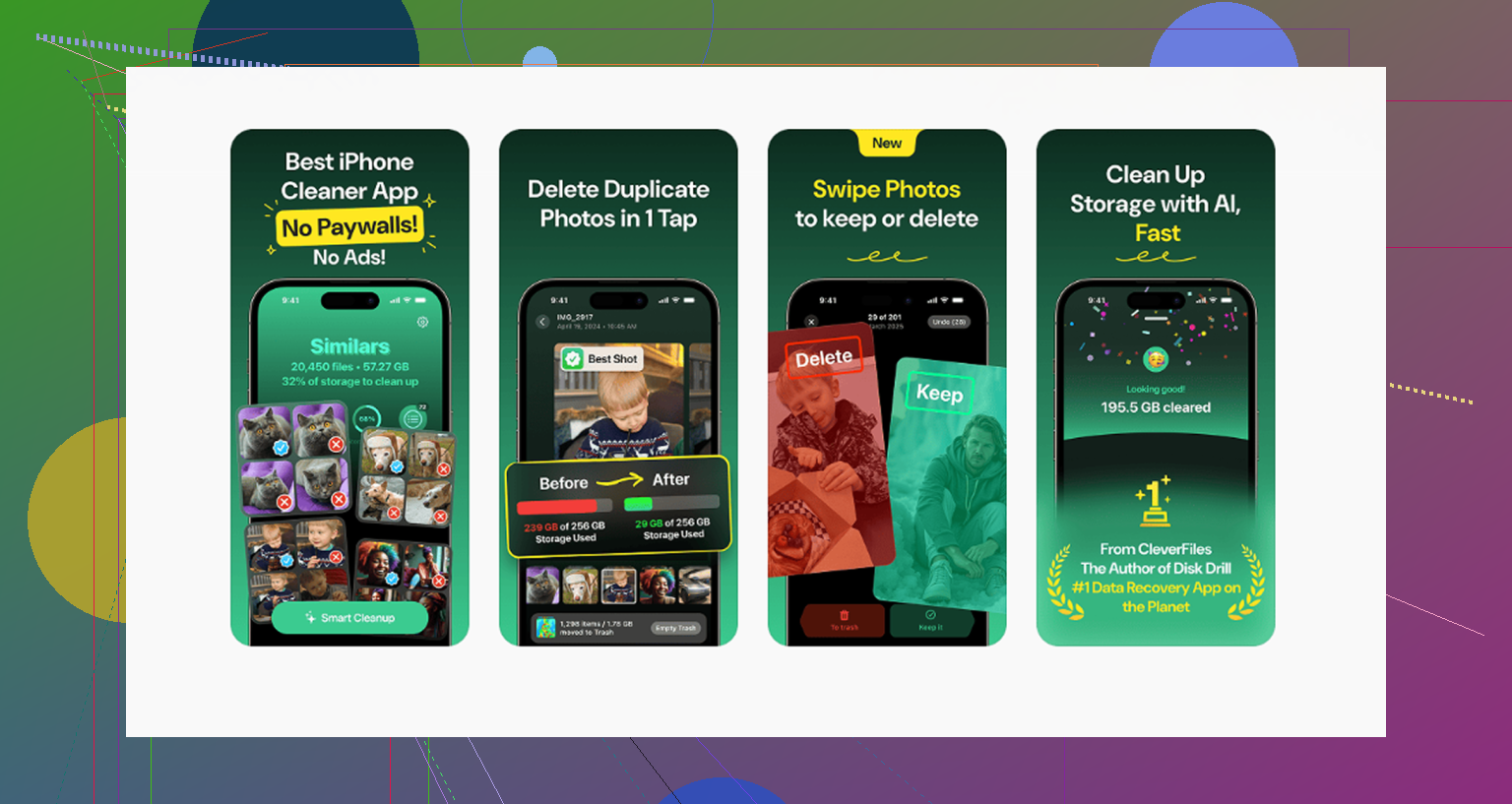
What you can clean is your own media. Photos, videos, screenshots, oversized files. For most people, that’s where the storage went anyway. I checked a few threads on this before helping someone in my house sort their iPad, and one app kept showing up over and over: [Clever Cleaner](https://www.reddit.com/r/iosapps/comments/1j1qaws/clever_cleaner_a_truly_free_iphone_cleaner_no_ads/).
The part people seemed to care about most was simple. It has a native iPad version. No stretched phone UI. No ad spam. No subscription wall popping up right before deletion. It’s free in the plain meaning of the word, which is weirdly rare in this category.
A lot of cleaner apps do the same annoying trick. You scan your library, the app finds clutter, then right when you try to remove anything, it asks for payment. I’ve seen people complain about this enough times that I don’t even bother testing many of them now. This one skips all of that.
On duplicate and similar photos, it does a better job than I expected. The Similars section doesn’t only catch exact duplicates. It also groups those near-identical runs you get from burst shots, repeated attempts, tiny angle changes, and lighting variations. If you took ten photos of the same thing because one might come out sharper, it pulls those into one group. Then it picks a Best Shot and lets you toss the rest fast.
That’s the main place where it feels better than CCleaner. CCleaner has a habit of labeling unrelated images as similar, which ruins the whole point because then you need to inspect every group by hand. Here, the grouping looked tighter from what I saw. Less babysitting. More actual cleanup.
On iPad, this matters more than on phone, at least in my experience. People keep giant photo libraries on tablets. Old videos too. School stuff, family albums, screenshots from years ago, screen recordings nobody remembers making. Storage gets eaten in clumps, not crumbs.
Another useful section is Heavies. It sorts media from biggest to smallest and shows the exact file size for each item. This is one of those boring features that ends up saving the most time. You instantly spot the 4K clips, long screen captures, and giant videos doing the damage.
The Screenshots section is also done right. It shows file size before deletion, so you know what you’re removing and what space you’ll get back. No guessing. No fake progress bar drama.
One thing I liked, and I think more people should care about, is local processing. Everything stays on the device. Nothing gets sent off to some outside server. If your iPad has work files, personal pictures, or random private junk from years of use, that matters.
And yes, the free part seems to be true. No ads, no subscription nag, no paywall before cleanup. I’m saying “seems” because I always expect these apps to change later, but from what’s been reported and from current use, it’s free across the whole cleanup flow.
You do need to keep one expectation realistic. No app on iPadOS gets access to system files or deep cleanup tools. Nobody is clearing Safari cache or scrubbing the operating system the way CCleaner does on a PC. For system-level storage management, you still need to open Settings, then General, then iPad Storage.
If your problem is media clutter, Clever Cleaner looks like the closest thing to a useful CCleaner substitute on iPad.
If you want to cover the other common messes too, people usually pair it with Easy Cleaner for duplicate contacts and Cleanfox for newsletter cleanup. Between those and manual checks in iPad Storage, you’ve handled most of the stuff people mean when they say their iPad needs cleaning.
You won’t find a true CCleaner for iPad. iPadOS blocks the deep cleanup stuff. No app gets to sweep system junk the way CCleaner does on Windows.
I agree with part of what @mikeappsreviewer said, but I’d push one point harder. If your iPad feels slow, storage is only half the story. Performance drops often come from Safari tabs, bloated app data, old iPadOS builds, and low free space. iPads tend to slow down once free storage gets under about 10 percent.
What I’d do:
1. Check Settings, General, iPad Storage.
Look for apps with huge “Documents and Data” sizes. Delete and reinstall those apps. Offloading does not always clear the junk.
2. Clear Safari the Apple way.
Settings, Safari, Clear History and Website Data. This helps more than most “cleaner” apps, tbh.
3. Restart the iPad.
Sounds dumb, works more often than people admit.
4. Update iPadOS.
Some lag is bug related, not clutter related.
5. For photo cleanup, use Clever Cleaner.
It’s one of the few free options people keep mentioning for iPad photo cleanup, and it’s safer than the fake cleaner apps with paywalls.
6. Leave 5 to 10 GB free.
iPadOS runs worse when storage is packed.
If you want a quick outside look, watch this honest iPad cleaner app review and storage cleanup test.
So, safe free app for media cleanup, yes, Clever Cleaner. True CCleaner-style system cleaning, nope. Apple does not allow it.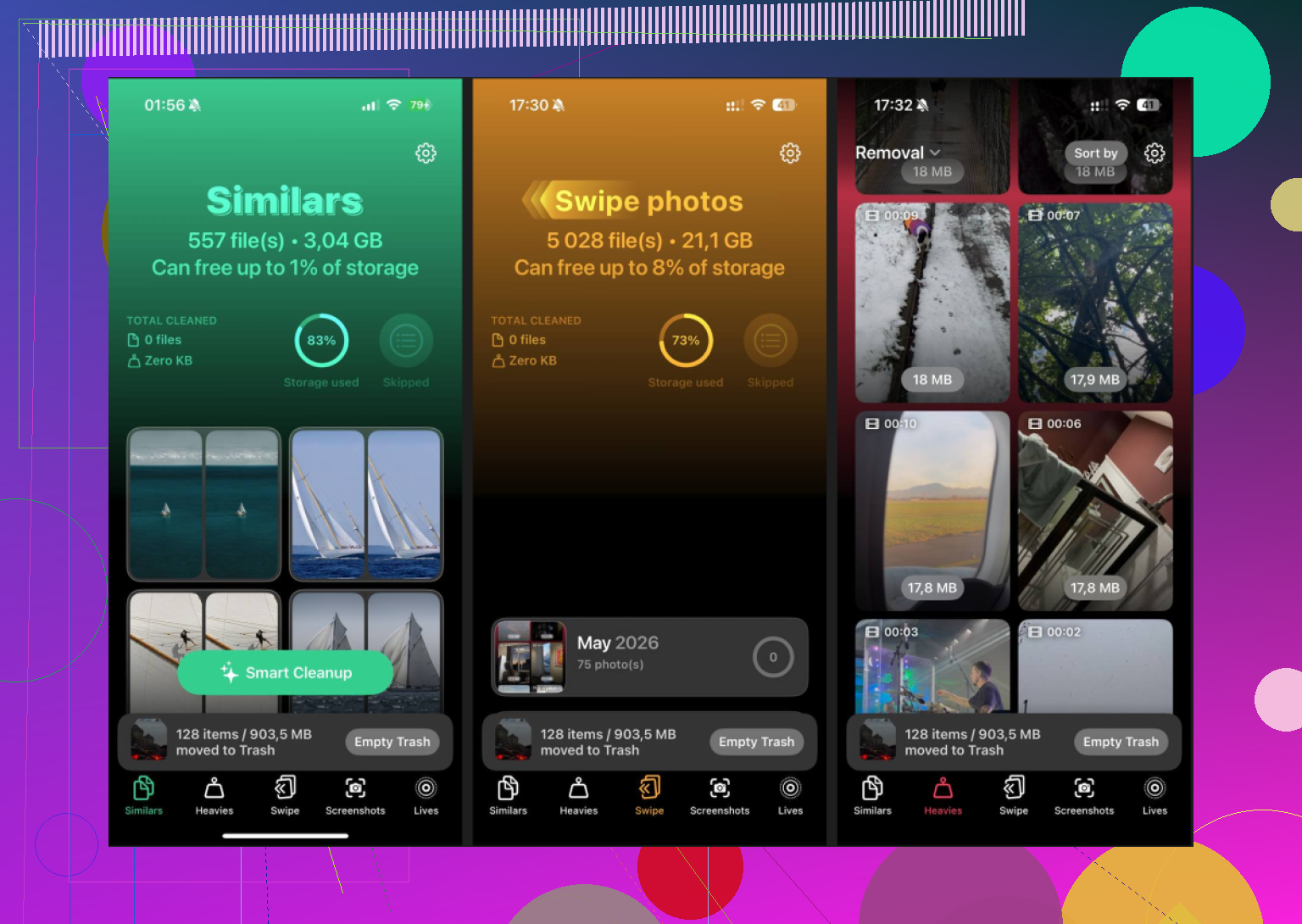
No real CCleaner-style iPad app exists, and this is where I slightly disagree with how people frame it. It’s not just that Apple blocks deep cleaning. A lot of the “my storage never goes down” issue is iPadOS doing temporary caching and delayed storage recalculation. So sometimes you delete stuff and the number does not update right away. Annoying, but normal-ish.
@mikeappsreviewer and @sterrenkijker already covered the media-cleaner angle, so I’d look at one extra culprit: Messages and streaming apps. Message threads with tons of videos, plus Netflix/YouTube/Spotify downloads, can quietly eat gigs. Same with Procreate, CapCut, GarageBand, and note-taking apps.
If you want a free cleaner for the part apps are actually allowed to touch, Clever Cleaner is probly the best fit for photos/videos. Native iPad support matters more than people think. Also worth reading this detailed Clever Cleaner review for iPhone and iPad cleanup.
One more thing people skip: if the iPad is several years old, “slow” may be battery aging or RAM limits, not junk files. Cleaner apps won’t fix that. Sometimes the answer is less magical and more “your iPad is just getting old,” which kinda sucks but yeah.