I accidentally deleted important files from my USB flash drive, and now I’m trying to recover them without making things worse. I’m looking for the best USB recovery software or flash drive recovery tool for beginners that’s easy to use, safe, and actually works.
I’ve wrecked enough USB sticks to stop pretending I’m careful. Wrong format target, yanked a drive mid-copy, ignored the “scan and fix” prompt, all of it. And yeah, when files disappear from a flash drive on Windows, they do not land in the Recycle Bin. They’re gone from view, and you’re left staring at the drive letter like it owes you money.
If the stick is physically dead, crushed shell, burnt controller, bent connector, then software won’t perform miracles. Short of that, recovery software is usually the first thing I’d try before paying a lab. A lot of the time the files are still sitting on the memory. The file table is what got scrambled.
For a USB drive, the one I kept going back to was Disk Drill. I started using it after one of those free promo thumb drives quit on me with class notes and some project files still on it. Annoying little brick.
What helped was how it handled messy flash media. A lot of USB sticks are FAT32 or exFAT. Disk Drill does well with both, especially when the drive starts showing up as RAW or the file system looks busted. It searches by file signature, so it doesn’t depend only on the original file system map being intact.
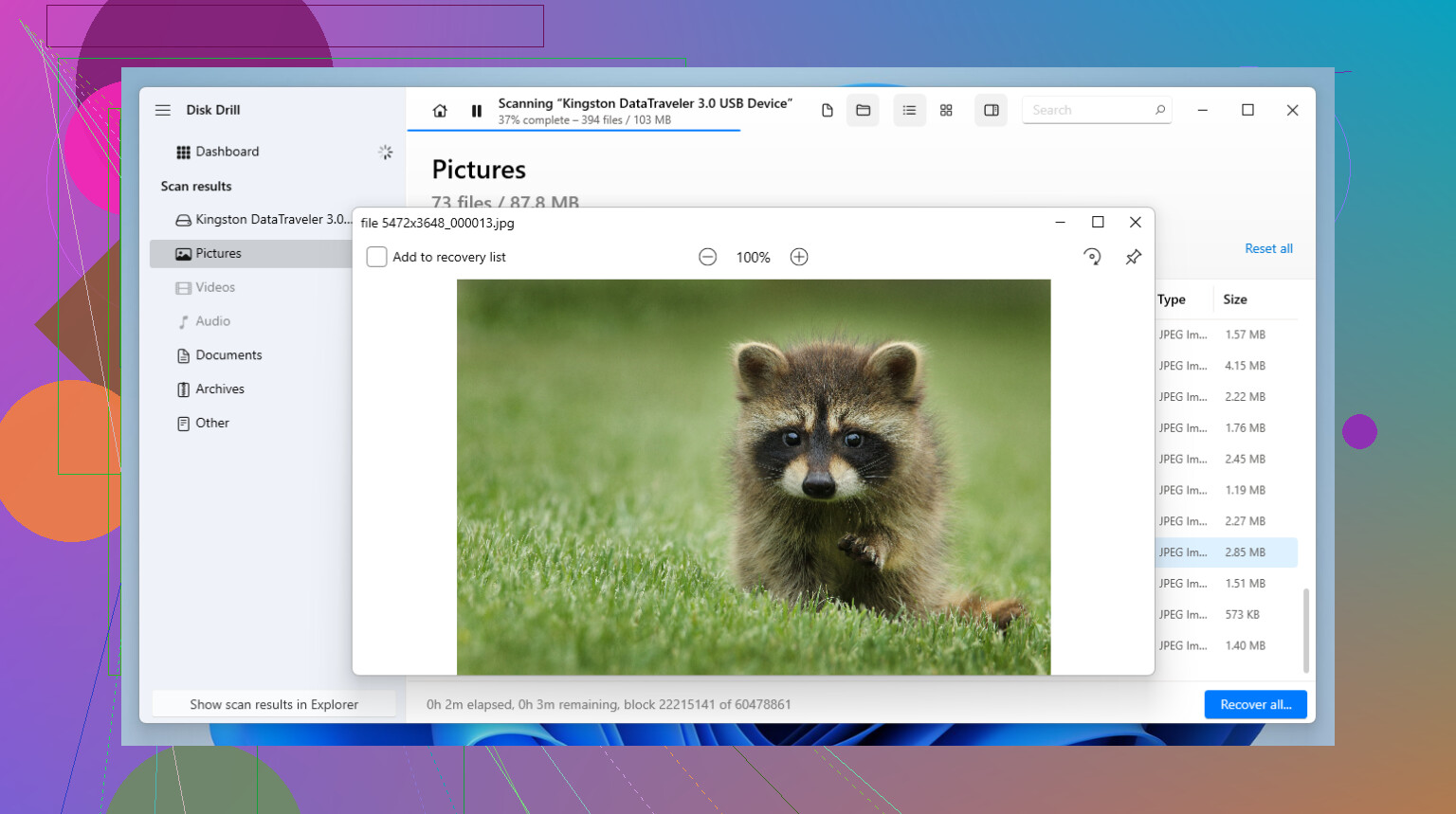
The preview feature matters more than people think. I learned this the hard way after sitting through a long scan once, only to recover a pile of broken files I couldn’t open. Being able to check a photo or document before saving it cuts a lot of wasted time. It also includes a byte-to-byte image option, which I’d use right away if the flash drive keeps disconnecting or acts weird during reads. Scan the image, not the failing stick. Less stress on the hardware.
If you’re comfortable with old-school tools and crowded menus, R-Studio is another one worth knowing. I used it once on a drive with a missing partition and, yeah, it dug up stuff other tools missed. But the interface feels rough, and the terminology is not friendly. For simple accidental deletion, I wouldn’t bother. For a drive in bad shape, it earns its place.
For free tools, I’ve had mixed results.
-
Recuva works fine for the easy cases. If you deleted something recently and haven’t written anything new to the USB, it’s often enough. Light install, simple layout, no drama. Once the drive is formatted or starts reading as RAW, it falls off fast. Good for “oops.” Not great for “this drive is cursed.”
-
PhotoRec is the brute-force option. It’s open source, and it finds a lot because it scans by signatures instead of relying on directory info. The tradeoff is ugly. No proper filenames, no original folder tree, and the interface feels like a time capsule. I used it once and got back thousands of files with names like f12345.jpg. It worked, but sorting through the results took forever. If your budget is zero and your patience is high, it still has value.
A few things I’d do first, without overthinking it:
-
Stop using the USB immediately. Unplug it. Don’t browse it, don’t copy new stuff onto it, don’t let Windows fiddle with it. Small writes are enough to overwrite deleted data.
-
Recover to a different drive. Always. If the source is the USB, save the recovered files to your PC drive or another external disk. Writing recovered files back onto the same stick is how people destroy what they were trying to save.
-
Check the free limit before paying. A lot of freemium tools, including Disk Drill, let you recover a small amount first on Windows, often around 100MB. I’d use that space to test a few important files. If those open cleanly, then paying starts to make sense.
One more thing. If the USB doesn’t appear in Disk Management at all, not even as unallocated space, then this might be a hardware issue and software won’t get far. But for most normal flash drive messes, deleted files, accidental format, RAW file system, corrupted partition info, software recovery is where I’d start. Hope your stuff is still there.
6 Likes
If you want beginner-friendly USB recovery software, keep it simple. Start with Disk Drill. It’s one of the easier flash drive recovery tools to use, and the preview is useful for checking files before you save them. For accidental deletion on a USB stick, that matters more than fancy menus.
I sort of disagree with @mikeappsreviewer on one point. I would not jump to PhotoRec unless you’ve run out of easy options. It finds a lot, sure, but the file names and folder structure usually come back as a mess. For a first try, that’s a headache.
My order would be:
- Disk Drill for the first scan.
- Recuva if the deletion was recent and the USB still looks normal in Windows.
- TestDisk only if the issue is partition-related and you don’t mind a steeper learning curve.
If your USB is flaky, make an image first, then scan the image. If it reads fine, scan once and recover files to your computer, not back to the flash drive. Small mistake, big loss. I learned this the dumb way.
Also, this is a solid roundup if you want a clean, easy list of the top data recovery apps for USB drives and PCs:
best data recovery software for USB drives and deleted files
Short version, Disk Drill is the easiest place to start. Recuva is fine for simple oops deletes. Skip the more technical stuff unless the easy tools fail. The less you poke the drive now, the beter your odds.
I’d keep it even simpler than @mikeappsreviewer and a little less tool-hoppy than @caminantenocturno.
If you want beginner-friendly USB recovery software, start with Disk Drill. Not because it’s magic, but because it explains what it finds in a way normal humans can actually follow. For a lot of people, that matters more than squeezing out 2% more recovery from some crusty expert tool.
Where I kinda disagree with the usual advice: Recuva is not always the best “easy” fallback anymore. It’s fine, sure, but on flaky flash drives I’ve seen it miss stuff or give results that look better than they actually are. Great for basic deletes, less great when the USB is acting wonky.
What I’d do:
- plug the USB in once
- if it mounts, scan it with Disk Drill
- preview the most important files first
- recover them to your computer, not the USB
If the drive disconnects, freezes, or suddenly asks to be formatted, stop messing with it. That’s where beginners make it worse real fast.
Also, if you want a simple walkthrough, this is a solid easy guide to recover deleted files from a USB drive.
Short version: best USB recovery software for beginners = Disk Drill first. If it finds clean previews, you’re probly in decent shape. If the stick is physically dying, software can only do so much.