I tried UnAIMyText to make my writing sound more natural, but I’m not sure if the results are actually good enough for school and work. Some parts still seem AI-generated, and I need help figuring out if this tool is reliable, worth paying for, and safe to use before I depend on it more.
UnAIMyText AI Review
I tried UnAIMyText because the pitch looked absurdly generous. Free. No account. No cap on usage. Up to 1,000 words each time. If you only read the front page, it looks decent. After testing it myself, I would not use it for anything important.
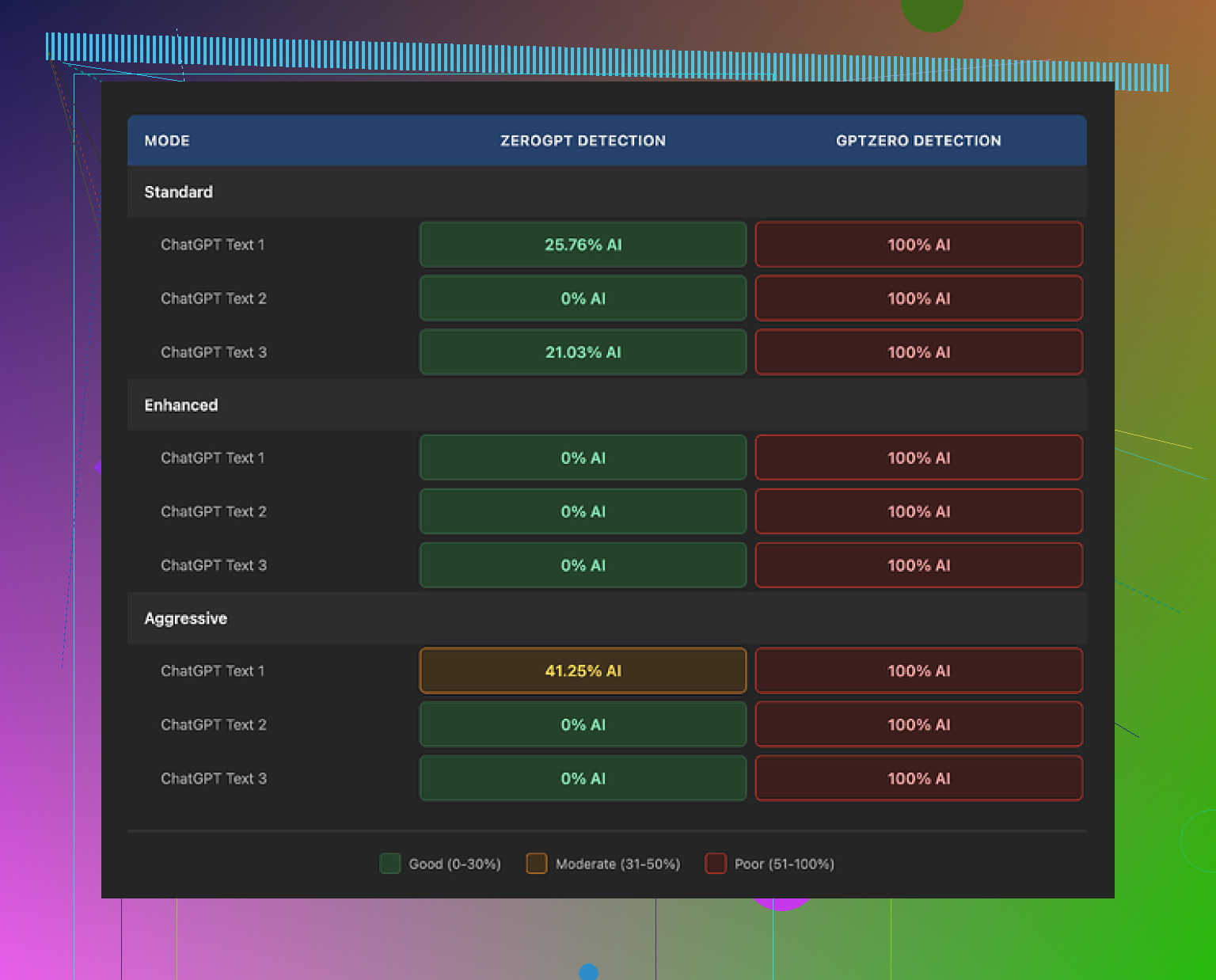
I ran its output through GPTZero and every version got flagged at 100% AI. I tested all three settings, Standard, Enhanced, and Aggressive. Same result every time. If your goal is cleaner text with a lower AI signal, this did not get me there.
The bigger issue was the writing itself. It read like a thesaurus got dropped down the stairs.
Standard mode was rough, around a 4/10 for me. It kept spitting out fake-sounding wording like “anticipatable” and “architectured.” Those aren’t the sort of edits you keep. Those are the edits you delete fast.
Enhanced mode was worse, maybe a 3/10. I got lines like “the dramatic leaving of the glaciers,” which sounds like broken machine translation, not normal English. A few sentences were so mangled I had to reread them twice and still coudln’t tell what they meant.
Aggressive mode did not fix anything. It wandered off-topic, added weird wording, and tossed in random terms with no logic behind them. In one cybersecurity passage it inserted “robots” for no clear reason. In another sample about climate policy, it called a solution “one of the good plays.” Nobody writes like this unless they are trying to lose an argument on purpose.
Another thing I noticed, all three modes padded the text hard. A 200-word input kept turning into 300 words or more. So you are not getting sharper writing. You are getting bloated copy with extra filler and stranger vocabulary.
After a few tests, the pattern felt obvious. The tool seems to swap words blindly, with little sign it checks context, tone, or plain readability. Also, the three modes barely felt different from each other. Labels changed. Output style didn’t, at least not in any useful way I could see.
I also read through the privacy terms. Oddly, they mention account deletion steps even though there are no user accounts. I can’t prove anything from that alone, but it gave me the feeling the legal page was pasted from a generic template and not cleaned up.
For a side-by-side comparison I also looked at this review thread, then tested alternatives on my own. The one I found more usable was https://cleverhumanizer.ai. It performed better in my checks and did not mangle the text in the same way.
12 Likes
I’d treat UnAIMyText as a rough editor, not something you trust for school or work.
My take is a bit less harsh than @mikeappsreviewer on one point. It sometimes smooths a stiff sentence. The problem is consistency. One line reads fine, the next line sounds off. That makes it risky.
What I’d check before using any output:
- Read it out loud. If you trip over a phrase, cut it.
- Compare word count. If 180 words turns into 260, it likely added filler.
- Look for weird synonym swaps. Those are easy tells.
- Check if your original meaning changed. This happns more than people notice.
- Paste only one paragraph at a time. Big chunks seem to drift more.
For school, I would not submit its output without a full rewrite. For work, same rule if the doc matters. Clean writing beats “humanized” writing.
If you want a safer option, I’d look at Clever Ai Humanizer. I found it keeps meaning better and needs fewer cleanup edits. Still, your own final pass matters more than any tool. Tools help. They don’t save bad text.
I’m kinda between @mikeappsreviewer and @voyageurdubois on this one. I do think UnAIMyText can make a paragraph feel less robotic at first glance, but that’s not the same as making it actually usable. Those are two diff things.
For school or work, the real test is not “does it look humanized,” it’s “would a teacher, boss, or client read this and think it sounds normal?” In my tests with tools like this, that’s where they usually fall apart. The sentence flow gets uneven. One part sounds fine, then another part has a weird word choice that no normal person would use. That’s a red flag even if a detector score changes.
Also, I wouldn’t rely too much on AI detectors alone. They’re inconsistent. Sometimes they flag human writing, sometimes they miss obvious bot text. What matters more is whether the writing keeps your original meaning, matches your tone, and doesn’t introduce awkward phrasing. If UnAIMyText keeps forcing odd synonyms or stretching short text into bloated text, that’s probly enough reason to avoid it for anything serious.
My honest take: okay for experiments, not reliable for final submission. If you want something in this category, Clever Ai Humanizer seems more stable from what I’ve seen, especially for keeping the meaning intact. Still needs editing though. None of these are magic, and that’s the annoying truth lol.