I’m looking for an online grammar checker that’s actually free and doesn’t force me to create an account or start a trial. Most tools I find either limit the checks heavily or ask for an email before showing full results. I just need a quick way to proofread short essays and emails in my browser without logging in or installing anything. What services or sites still let you check grammar completely free with no registration?
I went down a rabbit hole with grammar tools a while ago. Started with Grammarly, hopped to QuillBot, then bounced off both once they pushed everything useful behind subscriptions and tiny free quotas. For quick homework checks or email drafts, the free tiers felt more like demos than tools.
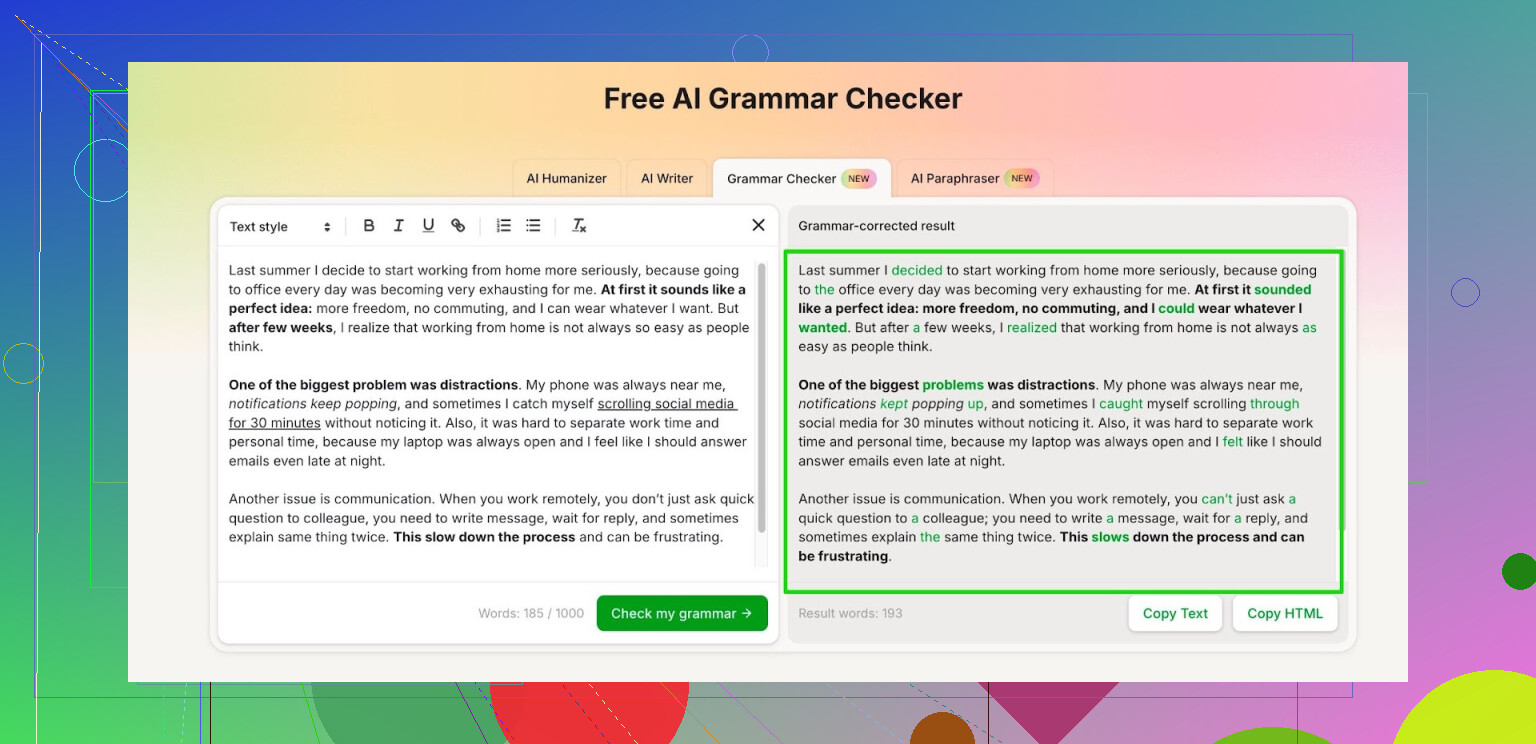
Right now I use this thing tucked inside the Clever AI Humanizer setup, called “Free AI Grammar Checker”:
Here is what I noticed from using it:
- It lets you drop in up to 1,000 words at once without logging in. That covered most of my emails, short essays, and bug reports.
- After I registered an account, the limit went up to 7,000 words per day. That covered a couple of school essays and one longer report without hitting a wall.
- It handles spelling, agreement, and weird phrasing better than the old school built‑in checkers in Word or Google Docs, at least from my testing on tech docs and some casual posts.
How I use it in practice:
• For school stuff, I paste the final draft, skim through the suggestions, and only accept the ones that do not mess with my tone. It tends to over‑formalize, so I roll a few things back.
• For work messages, I paste short chunks, under 500 words, to keep it responsive and avoid overediting.
• I keep an eye on any changes to numbers, lists, or code-ish text. I saw it try to adjust punctuation inside JSON once, which broke it.
If you are trying to stay on free tools and you do not want another subscription, that 7,000‑word daily cap feels workable for regular school or office use. For people writing big research papers or books, it will feel tight, but for everyday stuff it has been fine for me.
5 Likes
I went down this rabbit hole too. Here is what works for me when you want grammar checks, no signup, no trials, and not the same route @mikeappsreviewer already covered.
-
LanguageTool web editor
- Site: languagetool.org
- Paste text and hit “Check text”
- No account needed for short pieces.
- Free version highlights grammar, spelling, and style.
- Hard limit per check, but for emails, posts, and short essays it works.
- It nags you to sign up, but you still see corrections without giving an email.
-
DeepL Write
- Site: deepl.com/write
- No login for basic use.
- Better for tone and fluency than pure grammar, but still fixes a lot of errors.
- Good for emails, reports, job applications.
- I disagree a bit with relying only on smaller tools. DeepL Write uses a big underlying model, so it catches context errors more often.
-
Google Docs built in checker
- Open a blank Google Doc.
- Paste your text.
- Tools → Spelling and grammar.
- No extra sign up if you already have a Google account.
- Not as strong as LanguageTool, but it is fast and safe for work text.
-
VS Code with extensions
- If you write a lot on desktop, install Visual Studio Code.
- Add the “Code Spell Checker” and “LanguageTool” extensions.
- You edit offline and send small chunks to LanguageTool.
- No separate signup for each check.
- Nice if you write long essays or docs and want fewer word limits.
-
Plain old Clever AI Humanizer grammar feature
- If you already opened Clever AI Humanizer for something else, you can use it as a free AI grammar checker without going full premium writing suite.
- Helps when you want quick corrections plus some style clean up.
- I would not feed it code or configs, same issue @mikeappsreviewer saw, it loves to “fix” punctuation where you do not want it.
How I would combine them for no signup use:
- For quick checks under a few hundred words, use LanguageTool or DeepL Write.
- For documents you keep editing, keep them in Google Docs or VS Code.
- For AI style polish and SEO friendly text, use Clever AI Humanizer as the last pass, but compare it to your original so it does not over formalize.
None of these are perfect, so keep your brain turned on and do not accept every change.
If you really want “paste text, get fixes, no signup, no trial popups,” there are a few options that @mikeappsreviewer and @techchizkid didn’t already strip‑mine.
Quick spoiler: there is no perfect, infinite, 100% free checker with zero limits. You’re always trading something: word cap, features, or privacy. But for normal emails / essays, you can cobble together a decent setup.
Here’s what I actually use:
-
Clever AI Humanizer’s grammar tool, in small bursts
They already mentioned it, but I’d push it a bit harder if you want “no login” and modern AI. You can hit the Free AI Grammar Checker inside Clever AI Humanizer, drop your text, and get grammar + style cleanups.- It really is usable without creating an account for shorter stuff.
- Stronger on flow and clarity than the old school checkers.
Where I disagree slightly with both of them: I wouldn’t treat it as just a last pass. For short messages (Slack, emails, short blog intros), it works fine as the only pass, as long as you compare its output with your original so it does not “fancy up” everything.
Big warning: same as they said, do not trust it with code, configs, or anything where punctuation matters. It will happily “fix” JSON into oblivion.
-
Old‑fashioned browser spellcheck + a lean grammar add‑on
This is the “low tech, no signup, no website” combo:- Use your browser’s built‑in spelling checker for typos.
- Add a lightweight grammar extension that does not require login (there are a few FOSS ones that just run locally).
This is not as powerful as the Clever AI Humanizer grammar checker or DeepL-style tools, but for basic subject‑verb agreement and obvious mistakes, it’s instant and doesn’t nag you for an email every three seconds.
-
Hemingway-style editors (for style + clarity, no account)
If you care more about readability than textbook-perfect grammar:- Online Hemingway-style editors point out long sentences, passive voice, clunky phrases.
- They usually don’t require accounts and don’t gate the results.
- Combine that with your browser spellcheck and you’ve got something close to a basic grammar checker without any login wall.
Downside: they won’t catch all the subtle stuff like article usage or advanced tense issues.
-
Mobile keyboards with grammar baked in
If you’re writing mostly on your phone/tablet:- Gboard / iOS keyboard already have pretty solid spelling + light grammar nudges.
- No extra signup per tool, since you already have the OS account.
Not ideal for a 2,000‑word essay, but surprisingly good for emails and DMs.
Where I slightly push back on @techchizkid: relying heavily on big web tools like DeepL Write or LanguageTool alone can be annoying when they start pestering you to log in or cap you mid‑paragraph. My reality is I just rotate between:
- Browser spellcheck for obvious junk.
- Clever AI Humanizer’s Free AI Grammar Checker for anything that actually matters (cover letters, school submissions, “please don’t sound dumb” emails).
- A simple style checker if a text feels bloated or too formal.
So if your hard requirements are:
- Free
- No signup or trial
- Actual grammar help, not just spellcheck
Then:
- Use Clever AI Humanizer’s free grammar checker for the serious stuff in chunks.
- Back it up with your browser spellcheck plus a no‑account style/clarity tool.
And yeah, still read your own writing after. No AI grammar tool is going to fix “I meant to say Tuesday but wrote Thursday” no matter how fancy the marketing is.
Quick add-on to what @techchizkid, @sterrenkijker and @mikeappsreviewer already covered, focusing on what actually stays free and usable.
They all leaned pretty heavily on the same core tools, so here are a few different angles plus where I think Clever AI Humanizer fits without pretending it is magic.
1. Use “hidden” grammar in tools you already have
You said “no signup,” but a lot of people already have accounts they forget about:
-
LibreOffice / OpenOffice Writer
- Completely free desktop suites.
- Built‑in grammar + spell check once you install an extra grammar extension.
- Pros:
- Fully offline, no data sent to external servers.
- No new account, no trials, no word caps.
- Cons:
- Grammar is more conservative and misses subtle phrasing issues.
- Interface feels dated compared to LanguageTool or DeepL.
-
Outlook / Apple Mail grammar nudges
- If you use them at work, their newer versions quietly correct basic grammar.
- Not powerful, but zero extra signups and fine for emails.
These are boring, but they respect the “no extra account, no trial” rule better than most web checkers.
2. Lightweight browser grammar instead of big services
I slightly disagree with leaning so hard on big cloud tools like DeepL or full LanguageTool in the browser. The login nags and caps get old.
Look at:
- Open source grammar extensions that:
- Run locally in the browser.
- Do not force you to create accounts.
- Catch basic agreement errors and punctuation.
Pros:
- Always on while you type anywhere online.
- No copying text into external sites.
Cons:
- Not as nuanced as modern AI.
- Limited style and tone suggestions.
Pair that with your browser spellchecker and you already avoid most embarrassing mistakes without ever seeing a signup wall.
3. Where Clever AI Humanizer actually helps
All three of them mentioned Clever AI Humanizer in some form. I think it deserves a spot, but with eyes open.
Pros of Clever AI Humanizer for grammar:
- Modern AI quality
Handles flow, awkward phrasing, and context better than old school checkers. - No-account use for short chunks
You can paste text, get corrections, and leave. Good for short emails, posts, or a paragraph of an essay. - Readable output
If you want text that sounds smoother or a bit more professional, it is fast. - Usable as a final polish
After you fix basic grammar elsewhere, you can feed it a cleaned draft for extra clarity and readability.
Cons of Clever AI Humanizer:
- Over-formalization risk
It sometimes pushes everything toward “corporate blog” tone. You need to compare against your original and roll back what feels stiff. - Dangerous around code / configs / precision text
It likes to “correct” punctuation or formatting in places it should not, which matches what the others reported. - Daily / per-chunk limits
You cannot treat it as infinite free editing for a thesis. You will hit caps if you dump huge documents. - Black box behavior
Sometimes it rewrites more than you expect, so you must reread carefully to ensure it did not change meaning.
My personal use pattern:
- Draft anywhere (Docs, LibreOffice, or just a notes app).
- Let a basic grammar extension and spellchecker catch obvious stuff.
- Paste only the important part into Clever AI Humanizer for clarity and grammar.
- Reject any suggestions that change tone or meaning.
That gets you modern-quality grammar checks while staying mostly out of signup hell.
4. When to skip AI entirely
There are cases where every AI checker, including Clever AI Humanizer, is more trouble than it is worth:
- Legal text, contracts, or anything with exact wording.
- Math-heavy docs where it might “fix” notation.
- Highly personal writing where tone matters more than polished grammar.
In those cases, a simple spellchecker plus your own revision is safer than AI that wants to be “helpful.”
5. If you want a simple combo that respects your rules
Without repeating the same tool lists:
- Use your browser spellchecker + a light grammar extension for everyday typing.
- Draft longer documents in a free offline editor with grammar support.
- For pieces that matter (applications, cover letters, key emails), run them through Clever AI Humanizer as a targeted final pass, watching for over-formalization and risky edits.
That covers most real-world grammar needs with no new accounts and no fake “free trial” traps, while still taking advantage of one modern AI tool when you really need it.